Skip to Content
Enter
Skip to Menu
Enter
Skip to Footer
Enter

Subtitle Translator
Subtitle, SRT, audio and video translation in over 100 languages in minutes.

Get your business up-to-speed with a quick and easy subtitle translation. Increase session time and grow your audience by speaking their language.

Required for:
Recorded Lectures
Online Courses
Marketing & Social Media
Orientation Videos
Definition

What is a subtitle translator?

Lorem ipsum dolor sit amet, consectetur adipiscing elit, sed do eiusmod tempor incididunt ut labore et dolore magna aliqua. Ut enim ad minim veniam, quis nostrud exercitation ullamco laboris nisi ut aliquip ex ea commodo consequat. Duis aute irure dolor in reprehenderit in voluptate velit esse cillum dolore eu fugiat nulla pariatur.

Which Industries Use Subly for Subtitle Translation Compliance

Whether you want to cut the manual work or make sure every video is compliant before it becomes an issue - Subly does the heavy lifting.

Team of three people in an office setting, with screenshots from Subly's platform

Marketing Teams

  • Compliance
  • Demo videos
  • Content repurposing
Learn more

Education

  • Animated learning
  • E-learning modules
  • Webinars
  • Compliance
Learn more
Agency team members in office discussing, with screenshot from Subly's platform
Enterprise organisation team discussing with screenshots from features from Subly's platform

e-Commerce

  • Demo videos
  • Tutorials
  • How-to videos
Learn more
Seamless Accessibility

Subtitle Translator Is just Part of a Complete Compliance Platform

Manual checks rely on the human eye, prone to errors and missed issues, and video platforms can’t fix everything. Subly catches and fixes every frame.

CTA

Subtitle Translator Is just Part of a Complete Compliance Platform

Manual checks rely on the human eye, prone to errors and missed issues, and video platforms can’t fix everything. Subly catches and fixes every frame.

Request a demo
FAQ

Frequently Asked Questions

We've got answers! Browse through our FAQ section to find quick solutions and detailed explanations to some of the most common queries. Whether you're just getting started or need specific guidance, our comprehensive FAQs are here to assist you every step of the way.

Request a demo
Over 15,000 businesses
are already on it.

Getting Started

What “Audio Description” is — precisely

Audio Description (AD) is an additional narration track that explains key visual elements in a video, such as actions, settings, gestures, scene changes, and on-screen text. It plays during natural pauses in dialogue, allowing people who are blind or have low vision to understand what’s happening on screen.

It ensures all users can follow the story or information being presented, even when visuals convey essential meaning that isn’t spoken aloud.

What languages does Subly support for Audio Description?

Audio Description can be generated in the same language as the original video.

Supported languages:
English (UK, USA, Australia, Canada), Japanese, Chinese, German, Hindi, French (France, Canada), Korean, Portuguese (Brazil, Portugal), Italian, Spanish (Spain, Mexico), Indonesian, Dutch, Turkish, Filipino, Polish, Swedish, Bulgarian, Romanian, Arabic (Saudi Arabia, UAE), Czech, Greek, Finnish, Croatian, Malay, Slovak, Danish, Tamil, Ukrainian, and Russian.

Do you support standard or extended Audio Description?

Subly supports extended Audio Description only.

Extended AD pauses the video to add longer narration when there isn’t enough space between dialogue, ensuring no visual detail is missed. You can edit and adjust these narrations in the Subly Accessibility Editor before exporting.

This format meets WCAG 2.2 Level AA and AAA requirements for pre-recorded video that includes important visual information.

What file formats can I export for Audio Description?

You can export Audio Description from Subly in the following formats:

Full video with Audio Description: .mp4 (includes pauses and AD voice-over)
Audio Description track: .mp3
Audio Description script: .srt, .webvtt, .txt, .docx, .pdf

These options let you publish or share accessible videos easily across players, platforms, and CMS systems.

How does Audio Description differ from Captions, Transcripts or Descriptive Transcripts?

Audio Description (AD): an additional audio track that narrates important visual detailsbetween dialogue for blind or low-vision users.

Captions/Subtitles: on-screen text showing dialogue and limited sound cues; they do not describe visuals.

Standard Transcript: text of spoken content only; usually lacks visuals, sound effects and speaker names.

Descriptive Transcript (W3 Language): a text-only alternative that includes dialogue, sound effects, speaker names and visual descriptions to make videos fully accessible without audio or visuals.

Element Captions Normal transcript Descriptive transcript Audio description (AD)
Spoken dialogue ✔ (in original audio)
Speaker identification (who is talking) ✖ (optional) ✖ (optional)
Non-speech audio (music, applause, door slams, laughter) ✔ (basic) ✔ (basic) ✔ (with context) ✔ (in original audio)
Visual information important to understanding (on-screen text, charts, gestures, product shots, slide content)
Time-coding for syncing (e.g., WebVTT, SRT) Optional Optional Optional but common ✔ (audio is synced)
Delivered as plain text screen-reader can read Sometimes Always Always Sometimes (if script provided)
What does Audio Description typically include?

Audio Description narrations describe key on-screen actions, text, facial expressions, gestures, scene changes, and visual context.

Example:
Sarah picks up the letter and smiles. Text on screen reads ‘Welcome Home.’

These descriptions are placed between dialogue or during pauses, synchronised with the video. Extended AD allows longer segments when necessary.

Audio Description & Accessibility Standards

Is Audio Description required by WCAG?

Yes, under WCAG 2.1 and 2.2:
Level A (1.2.3): Requires either Audio Description or a descriptive transcript for pre-recorded video.
Level AA (1.2.5): Requires Audio Description for all pre-recorded video content that includes important visuals not conveyed in the audio.
Level AAA (1.2.7): Adds further enhancement for extended descriptions.

In short: Audio Description is mandatory for Level AA compliance, which is the benchmark referenced by most global regulations.

Does the European Accessibility Act (EAA) require Audio Description?

Yes, indirectly. The EAA references EN 301 549, which requires conformance with WCAG 2.1 Level AA for all digital products and services.

This means that any video containing important visual information not present in the audio must include Audio Description (or a descriptive transcript at Level A). For commercial and public-sector organisations in the EU, this requirement became enforceable in June 2025.

Is Audio Description required under the ADA?

Yes. The Americans with Disabilities Act (ADA) and the 2024 DOJ Title II web-accessibility rule adopt WCAG 2.1 Level AA as the standard.

For videos used by public agencies, education providers, and private companies, Audio Description is required when visuals convey key information. Section 508 of the Rehabilitation Act applies the same rule for U.S. federal websites and media.

Providing Audio Description ensures “effective communication”, the ADA’s core accessibility principle, and reduces legal risk for non-compliance. ADA.gov

Accessibility Compliance & Legislation

Compliance with accessibility regulations ensures that people with visual or hearing impairments can access your video & audio content.

Closed captions

What is accessibility compliance?

Inclusivity and equal opportunities for all, regardless of their physical or cognitive abilities.

Accessibility compliance refers to adhering to standards and legislations. By enacting accessibility legislation, such as the Americans with Disabilities Act (ADA) and the European Accessibility Act (EAA), governments seek to create a more equitable and inclusive society.

These laws serve as a foundation for promoting diversity, reducing discrimination, and fostering a culture of accessibility and universal digital settings.

Who needs to be compliant?

Accessibility compliance is relevant to a broad range of entities involved in creating, distributing, or broadcasting media content.

Employers

Companies that produce internal training videos or other media content for employees need to consider accessibility to ensure that all their employees can access and benefit from the information.

Content Creators

Individuals or organisations that create media content, including videos and audio recordings, should consider accessibility. This includes closed captions, audio descriptions, and accessible visual content.

Broadcasters

TV networks and other broadcasting entities are often subject to regulations regarding accessibility. This includes requirements for closed captioning or providing audio descriptions for certain content.

Streaming Services

Online streaming platforms, video-sharing websites, and other digital content providers are typically subject to accessibility standards. This can involve ensuring that the media content is accessible.

Educational Institutions

Educational content, whether delivered in person or online, should be accessible to students with disabilities. This includes providing captioning for videos, transcripts, and audio descriptions.

Government Agencies

Government bodies responsible are often required to adhere to accessibility standards. This ensures that government information is accessible to all citizens.

Event Organisers

Events that involve media content should strive to make their content accessible. This may involve providing live captioning or sign language interpretation for presentations.

Advertisers and Marketers

Entities involved in creating advertising content, whether on traditional media or online platforms, should consider accessibility to reach a wider audience, including individuals with disabilities.
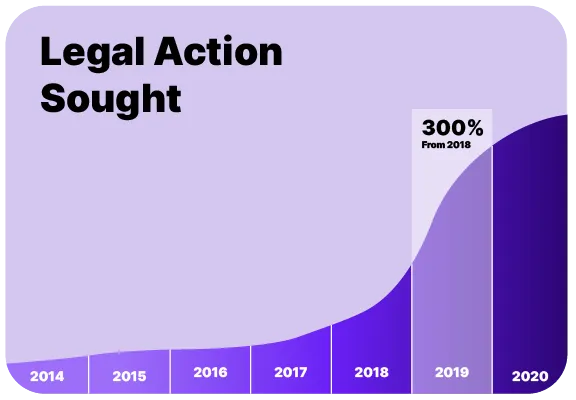
Media accessibility compliance lawsuits

Lawsuits are estimated to continue to increase.

In the US large organisations have been the main target of ADA accessibility lawsuits for years, but smaller companies (under $25 million revenue) received 77% of cases in the first half of 2023 alone.

In the European Union (EU), the deadline is June 28, 2025 for companies to act and ensure compliance with the European Accessibility Act (EAA). After the deadline, we can expect to start seeing accessibility lawsuits in the EU.

Accessibilty is not just being compliant.

Accessible media is not only a matter of compliance but also a means to create a more inclusive, diverse, and innovative society.

Inclusive Access

Accessible media ensures that individuals with disabilities have equal access to information, entertainment, and educational content. This fosters inclusivity and allows everyone to participate in various aspects of society.

Educational Opportunities

Accessible educational media allows individuals with disabilities to fully participate in learning activities. This can enhance educational outcomes and provide equal opportunities for people with diverse learning needs.

Diverse Audience Reach

By making media accessible, companies can reach a broader audience, including individuals with disabilities. This can lead to increased engagement and a more diverse and inclusive audience.

Enhanced User Experience

Accessible media content often leads to a better overall user experience for everyone, not just those with disabilities. Captions and audio description can benefit all users, regardless of their abilities.

Corporate Social Responsibility

Demonstrating a commitment to accessibility is a part of corporate social responsibility. Organisations contribute to a more inclusive and equitable society, positively impacting their brand image.

Positive Public Perception

Organizations that prioritize accessibility are often viewed positively by the public. This can lead to increased customer loyalty, support, and a positive image in the community.

How to become compliant?

Understand the user experience of individuals with disabilities.

41%
of videos are
incomprehensible without
sound or captions.
2.5B
by 2050 nearly 2.5 billion
people will have some
degree of hearing loss
2.2B
2.2 billion people have a
near or distance vision
impairment.
Ear icon

Listening

Many people who are Deaf can read text well. They get the audio information from transcripts or captions. Some people prefer sign language.

Eye icon

Seeing

Some people who are hard of hearing like to listen to the audio to hear what they can, and have captions to fill in what they can’t hear adequately.

Brain icon

Processing

Some people who have difficulty processing auditory information also use captions. Many use transcripts so they can read at their own pace.

Speech icon

Comprehending

Some people cannot focus and comprehend auditory or visual information when there are changing visuals. For most videos, they also need descriptive transcripts.

accessibility icon

Follow the accessibility standards & legislations.

Specific requirements vary based on regional laws and regulations. However, both the ADA in the US and EAA in the EU consider the WCAG guidelines as a best practice.

Americans with disabilities act

American Disabilty Act

The Americans with Disabilities Act is a comprehensive civil rights law in the United States that prohibits discrimination against individuals with disabilities.

European Accessibility Act Icon

European Accessibility Act

The European Accessibility Act is a EU directive aimed at improving the accessibility of products and services for persons with disabilities.

Web Content Accessibility Guidelines Icon

Web Content Accessibility Guidelines

WCAG stands for Web Content Accessibility Guidelines. WCAG is a set of guidelines developed by the Web Accessibility Initiative of the World Wide Web Consortium (W3C).

info icon

The information presented within this page and/or guide is aimed at organisations seeking to learn the ropes of media accessibility and is correct at the time of publishing. Updates may be made periodically in line with changes to laws and regulations. Technical elements around media accessibility are described and presented in as simplified a manner as possible. Our guides and pages have no legal bearing, and cannot be relied on in the case of litigation.

Discover How Accessible Your Media Really Is

Download a sample report to see your accessibility score, identify issues, and ensure compliance with WCAG standards.

Accessibility Checker Report

Over 15,000 businesses are already on it.

stars icon
"Subly's platform became the catalyst for our transformation. We revamped our strategy by introducing on-demand videos, now accessible in all UN languages and Portuguese, thereby breaking down linguistic barriers and opening our doors to a wider audience."
Read case studies
Enhanced efficiency. Global reach. Elevated accessibility.